

PDFxStream is used by the most demanding software teams to extract text, tables, images, and form data from billions of PDF documents every year.
Available on Java or .NET, PDFxStream provides complete PDF compatibility and unbeatable performance integrated into your application in 10 minutes or less. Enjoy the simplicity of a single, unified API, while paying only for the capabilities you need.
Getting data out of PDF documents really is this easy
Just download PDFxStream for Java or .NET to use these examples as the foundation for your own PDF data extraction solutions.
PDFxStream is used by companies and governments around the world to process billions of documents yearly.





Java or .NET, PDFxStream is available wherever you need to be.
PDFxStream for Java is written in 100% pure Java, with no native components or dependencies. Its only requirement is a compliant Java 1.5 (or higher) JVM.
PDFxStream is suitable for use in demanding desktop and server applications, including those with significant concurrency requirements. It has been designed to be amenable to parallelization, so that you can fully utilize your hardware and infrastructure investments when processing PDF documents without worrying about locking or race conditions.
Of course, being a Java library, PDFxStream may be used by any JVM language that supports interoperability with Java APIs, including Clojure, Scala, Groovy, JRuby, Jython, and so on.
PDFxStream for .NET is produced by translating the standard PDFxStream for Java binary into a pure managed .NET 2.0 assembly. This translation process is complete, and does not entail any side effects that impair its functionality, robustness, API's, or performance.
All of the concurrency and parallelism guarantees provided by PDFxStream for Java apply to its .NET cousin.
PDFxStream for .NET may be used by any .NET language, including C#, VB.NET, F#, managed C++, and so on.
Full details of PDFxStream for .NET are available here.
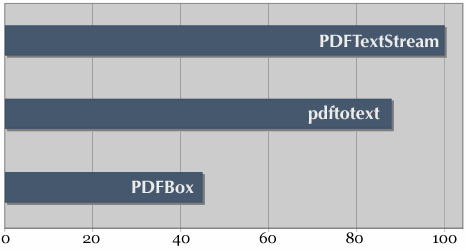
PDFTextStream is the fastest component available for extracting text and metadata from PDF documents, period.
PDFTextStream has two main goals when it extracts data from a PDF document: do it accurately, and do it fast.
Which of those two attributes is more important to your application is something only you can decide. However, in many environments, text extraction performance isn't just a nice-to-have: it's critical to your project's success. That's why we're glad to be able to make such a bold claim without reservation, and we have the numbers to back it up.
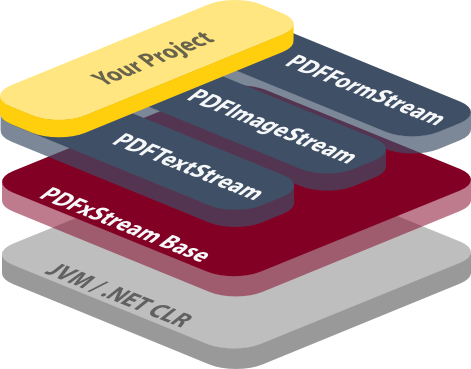
PDFxStream: Four PDF data extraction components, one unified API
Each component included in PDFxStream's API addresses a different class of data available to be extracted from PDF documents:
- PDFxStream Base is the foundation upon which all other PDFxStream features are built. It implements basic PDF file capabilities, and provides access to the simplest pools of data in PDF files.
- PDFTextStream provides comprehensive PDF text extraction capabilities
- PDFImageStream provides comprehensive PDF image extraction capabilities
- PDFFormStream provides easy extraction and filling of interactive and XFA forms found in PDF documents
Having one dependency and one API to satisfy your PDF data extraction requirements simplifies project management and minimizes development costs. Even so, you only need to pay for the components you use.
PDFTextStream
- Unicode text extraction, including support for Chinese, Japanese, and Korean (CJK) in both horizontal and vertical writing modes
OutputHandlerAPI for efficiently customizing PDF text extract formatting- Regional text extraction, ideal for extracting data from fixed-format forms
- Complete support for embedded and standard fonts and character encodings:
- Type 0, 1, and 1C
- TrueType
- Identity-H and Identity-V encodings
- CMap encodings (including hundreds of Chinese, Japanese, and Korean character sets, both horizontal and vertical writing modes)
- Automated layout processing, providing a traversable PDF document model including inferred block, line, column, and table structure
- Support for extracting text from "searchable image" PDFs
- Support for all varieties of rotated text
- Comprehensive support for extracting PDF tables, including via CSV for export to Excel
- Support for indexing PDF documents with Apache Lucene via lucene-pdf
PDFImageStream
- Decompression and decoding of dozens of PDF image types
- Rendering of images
to on-screen
graphics contexts (
java.awt.image.BufferedImageon Java, orSystem.Drawing.Bitmapon .NET) and saving to disk in familiar formats:- JPEG
- TIFF
- GIF
- PNG
- BMP
- Automatic stitching of image tiles and strips
PDFFormStream
- Support for extracting "Acroform" (interactive) form data from all
types of fields:
- Text
- Dropdowns ("Choice" fields)
- Radio buttons
- Checkboxes
- Pushbuttons
- Signatures
- Support for extracting XFA form data
- Support for filling "Acroform" fields, writing updated PDF documents
There's much, much more to the PDFxStream API than we can reasonably list here. Check out the PDFxStream developer's guide and API reference to learn about all that PDFxStream has to offer.
PDFxStream Base: complete PDF format compatibility and basic data extraction capabilities
The official PDF file format specification (published by Adobe) is large and complex. PDF files can be rich, dynamic documents, and getting to all of the interesting and useful parts of them (i.e. their content, text, metadata, etc) is a daunting task.
Further, Adobe's specification only provides normative descriptions of how PDF documents should be constructed. Experience shows that applications must often process PDF documents from multiple sources, each of which may (and do) generate PDF files that sometimes bend and often break the "official" PDF specification — similar to how web browsers are forced to support broken and malformed HTML documents as best as they can.
This is just one of the many reasons why continually supporting and maintaining PDFxStream is a never-ending task. Doing anything else would prevent us from guaranteeing maximum compatibility with all PDF document formats and variants "in the field", regardless of their source or to what degree they violate certain rules of good PDF file format etiquette.
PDF Format Support Details
The range of PDF file format features (and quirks!) that PDFxStream supports is broad and deep. To the right is a partial list of the major facets of the PDF specification that PDFxStream supports. If you are aware of a particular detail that is not listed, then please feel free to contact us to confirm that PDFxStream supports what you need.
PDFxStream Base implements a raft of foundational PDF capabilities and offers access to many types of PDF data:
- Compatibility with all versions of the PDF document specification, from v1.0 (corresponding to Acrobat 1) to v1.7 (corresponding to Acrobat 8 and higher).
- Support for decryption of PDF documents encrypted with or without a password using 40-bit, 128-bit, 256-bit, and variable bitlength ciphers (including RC4 and AES)
- Automatic "repair" of PDF documents to account for common malformations and irregularities
- Extraction of PDF annotations (links, text notes, etc)
- Extraction of embedded files and attachments
- Extraction of PDF bookmarks (a.k.a. outline, table of contents)
- Extraction of document metadata, as either key/value pairs or XML
- Extraction of raw character data
- Extraction of image metadata, including image dimensions, locations, and types
- PDF file merging
All of the other components that comprise PDFxStream build on top of PDFxStream Base's foundation.